Halloween Vector Graphic: A Designer's Guide to Spooky T-Shirt Art
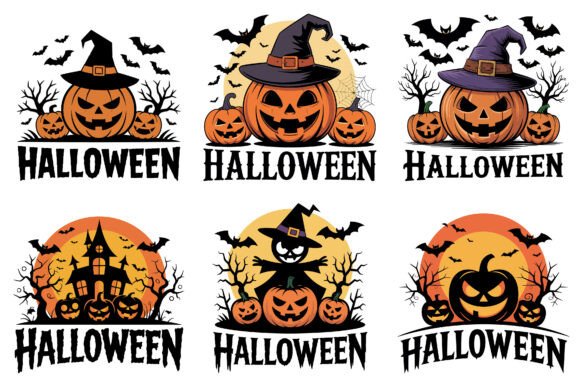
Every Halloween season brings a flood of generic clip art. You know the kind—stretched, pixelated, and devoid of any real personality. If you're creating merchandise, launching a seasonal campaign, or designing a personal project, you need assets that look professional and feel authentic. A well-crafted Halloween Vector Graphic isn't just a decoration; it's a foundational design asset that sets the tone for your entire project. This particular graphic is built for creators who refuse to compromise on quality or flexibility.
Understanding the Core Design Asset
Let's get specific about what you're working with. This isn't a simple illustration. The file package is structured for professional use, starting with a high-resolution PNG file at 5000 pixels and 300 DPI. That's print-ready quality with a fully transparent background, meaning you can drop it onto any surface—dark tees, colored mugs, textured posters—without fighting a white box. The inclusion of an EPS vector file is the real game-changer. Vector means the artwork is built from mathematical paths, not pixels. You can scale this Halloween Vector Graphic from a tiny phone case design to a massive banner without a single pixel of quality loss. The JPEG offers a quick preview, and everything arrives in a single, organized ZIP file. It's a complete toolkit, not a single file thrown over the fence.
Visual Style and Practical Appeal
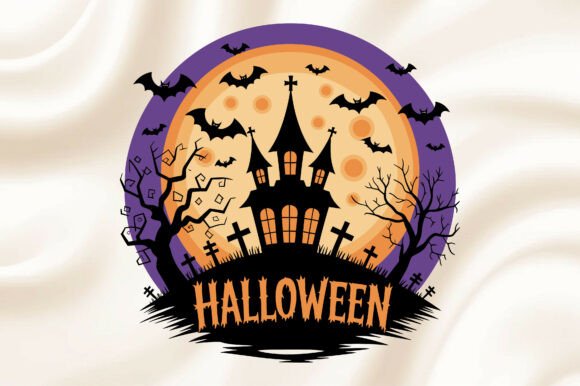
The aesthetic here leans into a classic, bold Halloween vibe. Think strong silhouettes, recognizable symbols, and a composition that commands attention. It's designed with modern typography principles in mind, even if the style feels vintage. The shapes are clean, the lines are intentional, and the overall personality is festive yet sophisticated—avoiding the overly cartoonish look that can cheapen a design. This makes it versatile. It can feel playful for a family-friendly event or edgy for a streetwear brand, depending on how you integrate it into your layout. The vector format is 100% editable, which means you can modify colors, isolate elements, or incorporate the graphic into a more complex design system. It's a starting point, not a finished product.
Where This Graphic Truly Shines
The applications are vast, but let's talk about where this Halloween Vector Graphic adds the most value. For t-shirt design, it's a perfect centerpiece. The high-resolution PNG ensures crisp prints on direct-to-garment (DTG) and screen-printed apparel. The vector file is ideal for creating cut files for vinyl transfers. But think beyond the shirt. It's equally effective for hoodies, tote bags, and hats—any apparel where a bold graphic makes the statement.
In the realm of packaging design and branding, this asset can drive a seasonal product line. Use it on labels for craft beer, coffee bags, or snack packaging. For editorial design, it can feature in magazine layouts, blog headers, or social media campaigns. The scalability of the vector means it works perfectly in web design for hero images or interactive elements, and in print design for posters, flyers, and party invitations. Crafters and hobbyists will find it invaluable for scrapbooking, custom stickers, and printable decorations. It’s a single asset with a long list of practical uses.
Integrating the Graphic Into Your Workflow
Having a great asset is one thing; using it effectively is another. Start by considering your project's existing brand identity. Does the graphic's style complement your color palette and overall tone? If your brand is minimalist, you might use just one or two elements from the design, not the whole scene. If it's maximalist, layer it with other design assets like textures and type.
For font pairing, this graphic demands a typeface that can hold its own. It often works well with a strong sans serif font for a clean, modern look, or a rustic serif font for a vintage feel. Avoid overly delicate script fonts that might get lost next to the bold illustration. Test your combinations at the actual size they'll be viewed. A pairing that looks good on screen might not read well on a small phone cover or from a distance on a poster.
When you open the editable vector EPS in software like Adobe Illustrator, take a moment to explore the file structure. See how the shapes are organized. This is your opportunity to customize. Change the orange to a neon green for a witchy theme, or swap the black for a deep purple. The ability to modify this creative font and graphic is what separates a template from a tool. Remember to check the licensing for any commercial project, though the included files are typically cleared for broad use.
Making It Work for Your Audience
Ultimately, the success of any design is judged by its audience. For marketers and content creators, this graphic can increase engagement on seasonal social media graphics. Its boldness stops the scroll. For small business owners, it offers a way to produce professional-looking merchandise or marketing materials without a custom illustration budget. For designers and publishers, it's a reliable, high-quality component to have in your library, saving time on client projects that need a Halloween theme.
The key is to use it with intention. Don't just slap it on a product. Build a layout around it. Create visual hierarchy. Let it tell a story. Whether you're designing a single t-shirt or a full brand campaign for October, starting with a solid, versatile asset like this Halloween Vector Graphic gives you the creative freedom to produce work that is both professional and genuinely engaging. It’s about having the right tools to execute your vision, pixel-perfect and scale-ready.